The Transactional Outbox Pattern: Guaranteeing Event Delivery
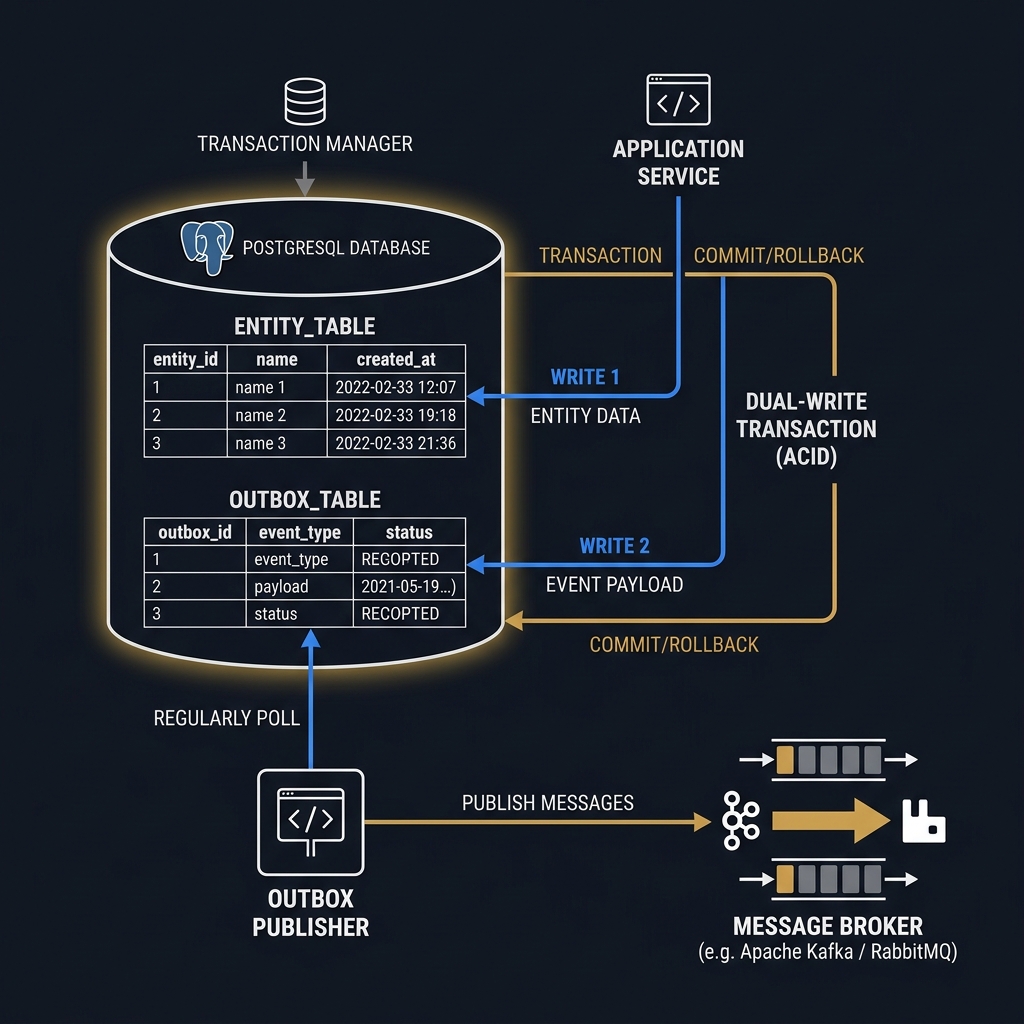
Concept
In event-driven microservices, systems must frequently update local database state and publish corresponding events to a message broker (e.g., RabbitMQ, Apache Kafka). For example, when an order is created, the Order Service must write to the Orders database and publish an OrderCreated event so that the Inventory Service can reserve stock.
This design introduces the Dual-Write Problem: a system must update two separate, non-transactional resources (a database and a message broker) without distributed transactions (2PC), which are too slow and fragile for modern distributed architectures.
Dual-Write Failure Scenarios:

Scenario A (Write DB, then Publish):
Database Transaction Success ---> Message Broker Down/Timeout ---> Event Lost!
Result: Database updated, but downstream services are never notified (Data Inconsistency).

Scenario B (Publish, then Write DB):
Event Published Success ---> Database Constraint Violation/Rollback ---> Event Dispatched!
Result: Downstream services act on an event for an order that physically does not exist.
The Transactional Outbox Pattern solves the dual-write problem by leveraging the ACID guarantees of the local database.
Instead of sending the message directly to the broker, the business transaction performs two writes within the same transaction:
- Updates the business entity (e.g., inserts a record into
Orders). - Inserts an event payload into a dedicated
Outboxtable.
Because both operations occur within a single database transaction, they are guaranteed to either succeed or fail together.
sequenceDiagram
    autonumber
    Client->>OrderService: POST /orders
    activate OrderService
    OrderService->>Database: Begin Transaction
    Database-->>Database: Write Order Entity
    Database-->>Database: Write Event to Outbox Table
    OrderService->>Database: Commit Transaction
    deactivate OrderService
    Database-->>Client: 202 Accepted

    loop Background Relay (Polling or CDC)
        OutboxPublisher->>Database: Query Unprocessed Events (Lock Rows)
        Database-->>OutboxPublisher: Return Events
        OutboxPublisher->>MessageBroker: Publish Event
        MessageBroker-->>OutboxPublisher: Acknowledge (ACK)
        OutboxPublisher->>Database: Delete or Mark Event as Processed
    end
Once committed, a separate background thread or service—the Outbox Publisher (or Message Relay)—reads unprocessed events from the Outbox table, publishes them to the broker, and marks them as processed or deletes them.
Constraints
While the Transactional Outbox pattern guarantees event delivery, it introduces key constraints:
At-Least-Once Delivery Guarantees
The outbox pattern guarantees at-least-once delivery, not exactly-once.
If the Outbox Publisher successfully publishes an event to the message broker but crashes before updating the event's state in the database, the restarted publisher will query the same event and publish it again. Consequently, downstream consumers must be idempotent. They must track processed message IDs to detect and discard duplicate events.
Outbox Table Contention under High Write Volumes
Under high-concurrency workloads, the Outbox table can become a major database bottleneck.
If multiple instances of the Outbox Publisher attempt to poll the database, they will contend for the same rows. In relational databases like PostgreSQL, naive polling queries will block, degrading database throughput. To prevent this, publishers must use specific lock instructions:
- PostgreSQL:
SELECT ... FOR UPDATE SKIP LOCKED - SQL Server:
SELECT ... WITH (UPDLOCK, READPAST)
These commands allow a publisher instance to lock unprocessed rows for update, while causing concurrent instances to skip those locked rows and process others, enabling horizontal scaling of the publisher relay.
Table Bloat and Housekeeping
If the Outbox Publisher marks rows as "processed" rather than deleting them, the table will grow indefinitely. A large table degrades index performance and increases transaction times.
A background database housekeeping task must periodically prune processed rows, which adds disk I/O and CPU overhead. Deleting rows immediately upon acknowledgment is the preferred approach for high-volume systems.
Trade-offs
Publishing outbox events can be executed via database polling or Change Data Capture (CDC):
| Metric | Polling Publisher | CDC Relay (e.g., Debezium + Kafka Connect) |
|---|---|---|
| Database Overhead | Moderate. Periodic SELECT queries consume CPU and disk I/O. |
Negligible. Reads directly from the transaction log without querying tables. |
| Latency | Configurable. Governed by the polling interval (typically $50\text{--}500\text{ ms}$). | Very Low. Near-instantaneous streaming as transactions commit ($<10\text{ ms}$). |
| Operational Complexity | Low. Built entirely within application code (e.g., background worker). | High. Requires running Kafka Connect, Debezium, and a schema registry. |
| Database Portability | High. Relies on standard SQL queries. | Low. Tied to database transaction log formats (e.g., Postgres WAL, SQL Server CDC). |
Decision Matrix
- Choose a Polling Publisher if operational simplicity is paramount, and your event generation rate is low-to-moderate (less than 1,000 events/second). It keeps the application self-contained.
- Choose a CDC Relay if you are operating at scale (greater than 1,000 events/second), require sub-10ms propagation latency, and want to keep database overhead decoupled from write operations.
Code
Below is a complete C# implementation of the Transactional Outbox Pattern using Entity Framework Core. It features an order placement transaction that writes to both the order and outbox tables, followed by a background worker (OutboxPublisherWorker) that polls and publishes events using database row locks (SKIP LOCKED) to prevent concurrency conflicts.
using System;
using System.Collections.Generic;
using System.Data;
using System.Linq;
using System.Text.Json;
using System.Threading;
using System.Threading.Tasks;
using Microsoft.EntityFrameworkCore;
using Microsoft.Extensions.DependencyInjection;
using Microsoft.Extensions.Hosting;
using Microsoft.Extensions.Logging;

namespace TransactionalOutbox
{
    // 1. Domain Entities
    public class Order
    {
        public Guid Id { get; set; }
        public string CustomerId { get; set; } = null!;
        public decimal TotalAmount { get; set; }
        public DateTime CreatedAt { get; set; }
    }

    public class OutboxMessage
    {
        public Guid Id { get; set; }
        public string Type { get; set; } = null!;
        public string Content { get; set; } = null!;
        public DateTime CreatedAt { get; set; }
        public DateTime? ProcessedAt { get; set; }
    }

    // 2. Database Context
    public class ApplicationDbContext : DbContext
    {
        public ApplicationDbContext(DbContextOptions<ApplicationDbContext> options) : base(options) { }

        public DbSet<Order> Orders => Set<Order>();
        public DbSet<OutboxMessage> OutboxMessages => Set<OutboxMessage>();

        protected override void OnModelCreating(ModelBuilder modelBuilder)
        {
            modelBuilder.Entity<OutboxMessage>().HasIndex(o => o.ProcessedAt);
        }
    }

    // 3. Message Broker abstraction
    public interface IMessageBus
    {
        Task PublishAsync(string eventType, string content, CancellationToken token);
    }

    // 4. Order Service implementing the dual-write inside a transaction
    public class OrderService
    {
        private readonly ApplicationDbContext _dbContext;

        public OrderService(ApplicationDbContext dbContext)
        {
            _dbContext = dbContext;
        }

        public async Task CreateOrderAsync(Guid orderId, string customerId, decimal amount, CancellationToken token)
        {
            // Execute both writes inside a single database transaction
            await using var transaction = await _dbContext.Database.BeginTransactionAsync(IsolationLevel.ReadCommitted, token);
            try
            {
                var order = new Order
                {
                    Id = orderId,
                    CustomerId = customerId,
                    TotalAmount = amount,
                    CreatedAt = DateTime.UtcNow
                };
                _dbContext.Orders.Add(order);

                // Serialize the event payload
                var eventPayload = JsonSerializer.Serialize(new { OrderId = orderId, CustomerId = customerId, Amount = amount });

                var outboxMessage = new OutboxMessage
                {
                    Id = Guid.NewGuid(),
                    Type = "OrderCreated",
                    Content = eventPayload,
                    CreatedAt = DateTime.UtcNow,
                    ProcessedAt = null
                };
                _dbContext.OutboxMessages.Add(outboxMessage);

                // SaveChanges persist both entities inside the atomic transaction boundary
                await _dbContext.SaveChangesAsync(token);
                await transaction.CommitAsync(token);
            }
            catch (Exception)
            {
                await transaction.RollbackAsync(token);
                throw;
            }
        }
    }

    // 5. Background Publisher Worker using SQL concurrency locks
    public class OutboxPublisherWorker : BackgroundService
    {
        private readonly IServiceProvider _serviceProvider;
        private readonly IMessageBus _messageBus;
        private readonly ILogger<OutboxPublisherWorker> _logger;
        private readonly TimeSpan _pollingInterval = TimeSpan.FromMilliseconds(200);

        public OutboxPublisherWorker(IServiceProvider serviceProvider, IMessageBus messageBus, ILogger<OutboxPublisherWorker> logger)
        {
            _serviceProvider = serviceProvider;
            _messageBus = messageBus;
            _logger = logger;
        }

        protected override async Task ExecuteAsync(CancellationToken stoppingToken)
        {
            _logger.LogInformation("Outbox Publisher Worker starting.");

            while (!stoppingToken.IsCancellationRequested)
            {
                try
                {
                    await ProcessOutboxMessagesAsync(stoppingToken);
                }
                catch (Exception ex)
                {
                    _logger.LogError(ex, "Error processing outbox messages.");
                }

                await Task.Delay(_pollingInterval, stoppingToken);
            }
        }

        private async Task ProcessOutboxMessagesAsync(CancellationToken token)
        {
            using var scope = _serviceProvider.CreateScope();
            var dbContext = scope.ServiceProvider.GetRequiredService<ApplicationDbContext>();

            // Open an explicit transaction to wrap the fetch-and-lock and final state update
            await using var transaction = await dbContext.Database.BeginTransactionAsync(IsolationLevel.ReadCommitted, token);

            // Fetch a batch of unprocessed messages.
            // Using a raw SQL query with 'SKIP LOCKED' (PostgreSQL syntax shown here)
            // allows horizontal scaling of the background worker across multiple application instances.
            var sqlQuery = @"
                SELECT * FROM ""OutboxMessages""
                WHERE ""ProcessedAt"" IS NULL
                ORDER BY ""CreatedAt"" ASC
                LIMIT 10
                FOR UPDATE SKIP LOCKED";

            var messages = await dbContext.OutboxMessages
                .FromSqlRaw(sqlQuery)
                .ToListAsync(token);

            if (messages.Count == 0)
            {
                await transaction.CommitAsync(token);
                return;
            }

            _logger.LogInformation("Processing batch of {Count} outbox messages.", messages.Count);

            foreach (var message in messages)
            {
                try
                {
                    // Publish to the external message broker
                    await _messageBus.PublishAsync(message.Type, message.Content, token);

                    // Mark message as processed
                    message.ProcessedAt = DateTime.UtcNow;
                }
                catch (Exception ex)
                {
                    _logger.LogError(ex, "Failed to publish outbox message {MessageId}. It will be retried in the next batch.", message.Id);
                    // Do not mark ProcessedAt. The transaction commit will update successfully sent messages,
                    // while leaving this one unprocessed for future runs.
                }
            }

            await dbContext.SaveChangesAsync(token);
            await transaction.CommitAsync(token);
        }
    }
}